


Insights
Complete Guide to AI Server After-Sales Service, Part 1: Four Layers of After-Sales Challenges from Components to Racks.
2026-10-22 10:43:30
AI server deployments continue to scale up, and equipment form factors stack up layer by layer, from components and boards to complete systems and racks. IDC's 2022 forecast noted that about half of products and assets were already connected (49.6%), expected to rise to 67.2% within three years[2]. But for data to translate into effective after-sales decisions, repair records must link across layers rather than stay confined to a single layer.
The industry often uses the Manufacturing Level (L1–L12) proposed by AMAX to describe how equipment is integrated from components to racks[1]. AI servers mostly use liquid cooling, and their grading adds liquid-cooling elements such as cold plates, quick-disconnect couplings, and piping on top of the air-cooled baseline[6] (Figure 1): L1–L5 are chassis parts and sub-assemblies; L6 is the motherboard installed in the chassis; L7–L9 add expansion cards, storage devices, CPUs, and memory in sequence; L10 is a complete, bootable server with a preloaded OS, which must pass leak detection and system testing; L11 is nodes installed in a rack, connected to the manifold, and ready to power on; L12 is a full rack ready for direct on-site deployment.
Figure 1: Liquid-cooled server Manufacturing Level [6] | ||||
From an after-sales perspective, each layer has different failure patterns, responsibility attribution, and repair logic, and therefore different service needs and solutions. This article groups them into four scenarios: component level (Component, L1–L5), board level (L6, including L7–L9 add-ons), system level (L10), and rack level (L11), and finally introduces how wareconn connects the layers. |
![Liquid-cooled server Manufacturing Level [6]](/up/261022/album/1792631209696273.jpeg "Liquid-cooled server Manufacturing Level [6]")
I. Component Level: Tiered Handling and Responsibility Determination
The component level is based on the L1–L5 chassis, power supplies, cables, and backplanes, and extends to independently replaceable functional components such as GPUs, memory, storage devices, and network cards. The repair flow is: incoming inspection → failure analysis (FA) → repair or replacement → outgoing test.
Component unit prices vary widely and failure sources involve multiple parties, so after-sales service needs fall mainly into two areas:
➤ Low-cost components: fast replacement, controlled spares | ||||
Low-cost components are replaced directly from spares without piece-by-piece analysis; high-cost components such as GPUs and HBM (high-bandwidth memory) go through the RMA (return merchandise authorization) process and are judged by FA after return, avoiding wrong replacements or repeated repair submissions that drive up spare-parts inventory costs. | ||||
➤ High-cost components: what failed and who is responsible | ||||
Beyond determining "what failed," high-cost components require tracing the failure back to the customer side, process side, or supplier side, namely CID (Customer-Induced Defect), PID (Process-Induced Defect), and VID (Vendor-Induced Defect). If the failure relates to design or process, it is also necessary to confirm whether test programs and architecture have been updated, and to implement this through an ECN (engineering change notice). | ||||
To address these two needs, high-cost parts follow standardized RMA and FA processes with unified failure-code mapping, each failure is attributed to CID, PID, or VID, and ECN and test-program versions are controlled. The prerequisite is complete traceability data: serial numbers suit tracking high-unit-price products, while batch statistics suit comparing high-volume products[3]. |
II. Board Level (L6, including L7–L9 add-ons): Repair Capability and Association Tracking
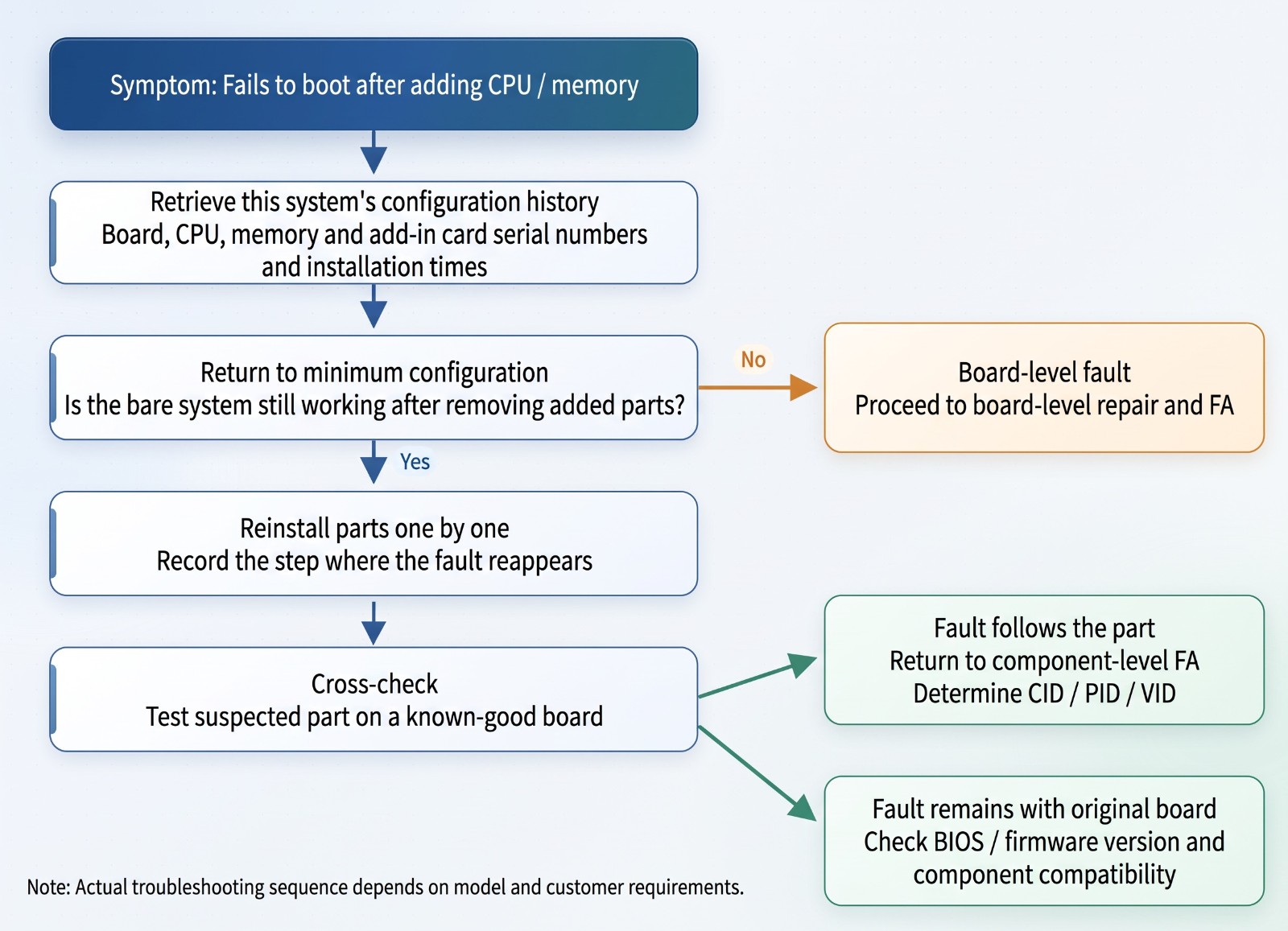
L6 is the first turning point in the integration process: the motherboard is installed in the chassis and power-on tested, forming a "bare-metal unit." L7–L9 then add expansion cards, storage devices, CPUs, and memory; liquid-cooled models also add cold plates and quick-disconnect couplings[6]. A typical scenario is a bare unit that boots normally but fails to boot after the CPU and memory are added: the problem may lie in the motherboard, a particular memory module, or the compatibility between the two and the BIOS version.
Board-level after-sales service needs depend on the board's unit price:
➤ Low-cost boards: free handling | ||||
The repair cost of a low-cost board may exceed the board itself, so the common practice is free replacement or scrapping, depending on unit price and contract. | ||||
➤ High-cost boards: testing and repair capability | ||||
Each added component changes the configuration, making the source of an anomaly hard to identify at a glance. Repairing high-cost boards for reuse therefore requires test programs, repair skills, and FA to pinpoint faults, and the low-level component spares needed for repair must also be stocked adequately. | ||||
➤ Component RTV and repair records | ||||
Defective components on a board can be returned to the supplier (RTV), which requires an error code and scrap certificate, and repair records must be retained for traceability. | ||||
In practice, faults can be worked back from symptoms (see Figure 2): first confirm whether the bare unit is normal, then check each newly added component (including cold plates and couplings on liquid-cooled models) and the BIOS version, and cross-verify on another known-good board if necessary. This requires the system to record the combination relationship and replacement history of boards and added components, that is, "association," and to manage repair records and spare-parts inventory. | ||||
Figure 2: Troubleshooting flow for anomalies after L6 add-ons |
III. System Level (L10): System Integration and Retest Verification
L10 is already a complete product, with hardware in place and the OS and software integrated. The flow is: system disassembly → locate the faulty component → replace → reassemble → power-on and burn-in test, shifting the focus from "replacing components" to "system-level operations."
System-level after-sales service needs center on system linkage and post-repair verification:
➤ Customer systems: repair and warranty information must connect | ||||
Complete systems are mostly already part of the customer's asset and ticketing systems, so repair and warranty information must be integrated for customers to keep track of equipment status. | ||||
➤ Logistics information: shipping, receiving, and repair progress must be visible | ||||
Systems travel back and forth between the customer and the repair center, so shipping and receiving, waybills, and repair progress must be integrated in real time. | ||||
➤ Retest verification: fixed does not mean problem-free | ||||
Replacing memory may trigger compatibility issues due to firmware version mismatch, and incomplete burn-in may let faults recur at the customer's site, so post-repair verification with test equipment and test programs is required. | ||||
To address these needs, the post-replacement retest process can be standardized and integration built at the system layer. Google Cloud's GPU validation covers low-level diagnostics, DCGM (Data Center GPU Manager) health diagnostics, NCCL (collective communications library) communication tests, and workload simulation[9], and some providers require that nodes failing diagnostics and stress tests not be admitted to the cluster[10]. Post-repair retesting can draw on these (see Figure 3), writing retest results, firmware versions, and replaced components back to the system's history record, while connecting customer systems and logistics information through APIs. | ||||
Figure 3: Post-repair retest flow for system level[9][10] |
![Post-repair retest flow for system level[9][10]](/up/261022/album/1792631226175542.jpeg "Post-repair retest flow for system level[9][10]")
IV. Rack Level (L11): Minimizing Downtime and Controlling Spares
L11 installs multiple nodes into a rack, completes network cabling and switch integration, and widens the test scope to the entire rack. Passing system-level tests does not mean cross-node operation is normal, and networking, cabling, and firmware version consistency become new variables. Taking the GB200 NVL72 as an example, its roughly 120 kW of heat is removed by direct liquid cooling, using blind-mate liquid-cooling manifolds and floating quick-disconnect couplings[7], and HPE's specification sheet lists hot-plug and hot-swap serviceability designs[8]. On-site work covers power, liquid cooling, and networking (see Figure 4).
Figure 4: Scope of rack-level on-site service[7][8] | ||||
Rack-level after-sales service needs center on downtime, returns to suppliers, and spares: | ||||
➤ On-site service: keep the downtime scope as small as possible | ||||
Faults mostly have to be handled on site in the customer's data room, involving power, liquid cooling, and network integration; data centers cannot easily be taken offline, and repairing one node may affect the entire cluster, so the focus shifts from "how to repair" to "how to shrink the downtime scope." | ||||
➤ RTV: customers return directly to suppliers, and documents must match | ||||
Some customers return faulty parts directly to suppliers (RTV), bypassing the assembly plant; clear failure records and documents are needed so that responsibility and quantities reconcile. | ||||
➤ Spares and big-data analytics: pre-position and keep accumulating | ||||
Spares must be pre-positioned by rack location and SLA (Service Level Agreement) tier, with stock levels tracked; accumulated repair data must also support big-data analytics as the basis for spare allocation and improvement decisions. | ||||
On-site flow: engineer arrives → locate the faulty server → hot-swap or replace the entire unit → verify overall operation. The solution is to move dispatch and spares forward: dispatch by rack location and SLA tier, pre-position spares on site, use hot-swapping to narrow the downtime scope, and retain RTV documents and repair records at the same time. This requires an on-site dispatch mechanism, SLA turnaround control, spare stock control, and big-data analytics. |
![Scope of rack-level on-site service[7][8]](/up/261022/album/1792631234568233.jpeg "Scope of rack-level on-site service[7][8]")
V. How wareconn Connects End-to-End Service from Components to Racks
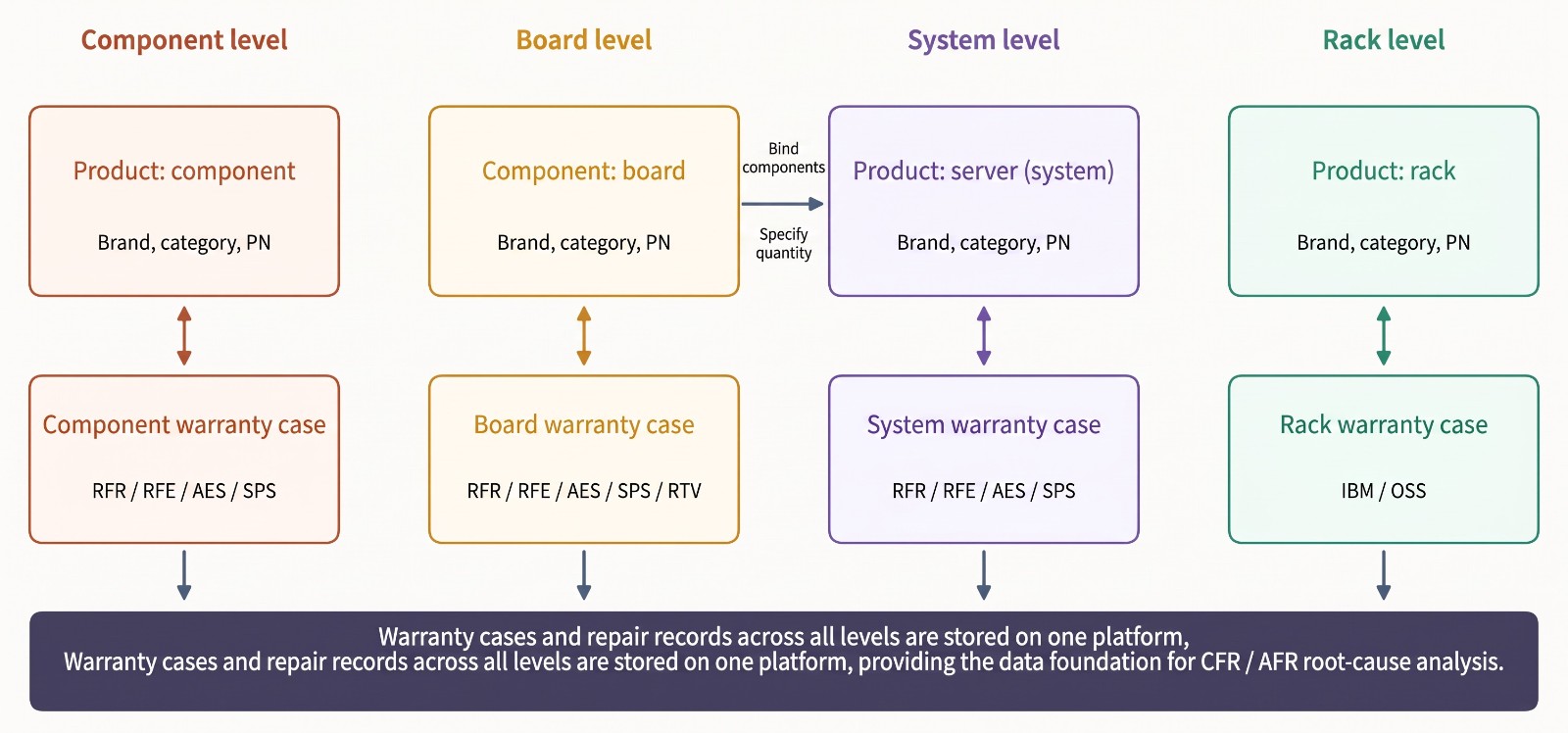
The system capabilities of the four layers are interlocked: component traceability supports board association, combination records form the system history, and the system history in turn underpins on-site service. A break at any layer leaves root-cause tracing without a basis. wareconn uses three functions, "Define Product / Part," "Product–Part Association," and "Multiple Warranty Types," to keep warranty records for all four levels on one platform (Figure 5).
Figure 5: Data relationships among wareconn products, parts, and warranty records | ||||
➤ Defining products and parts: | ||||
Component, system, and rack levels are created with "Define Product," while the board level is created with "Define Part"; entries can be added one at a time or uploaded in bulk using a downloadable template. | ||||
➤ Product–Part Association: | ||||
After selecting a product, you can "Bind Parts" and specify quantities, or use "Bulk Add and Bind" for systems, parts, and their associations, supporting association tracking and system history. | ||||
➤ Setting warranty types by level and customer: | ||||
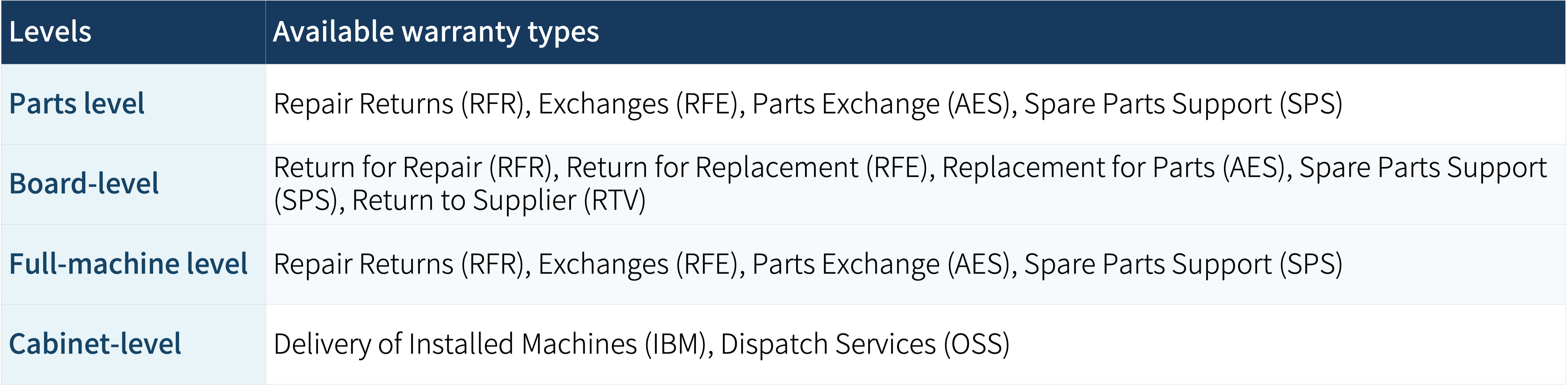
Warranty settings are made per customer: component, system, and rack levels are set by product category under "Product Warranty," while the board level is set by part PN under "Part Warranty," and both support bulk setup (Table 1). | ||||
Table 1: Warranty type combinations across the four levels | ||||
Because rack-level equipment is deployed at the customer site, it centers on delivery and installation (IBM) and dispatch service (OSS); the board level additionally includes return to supplier (RTV). | ||||
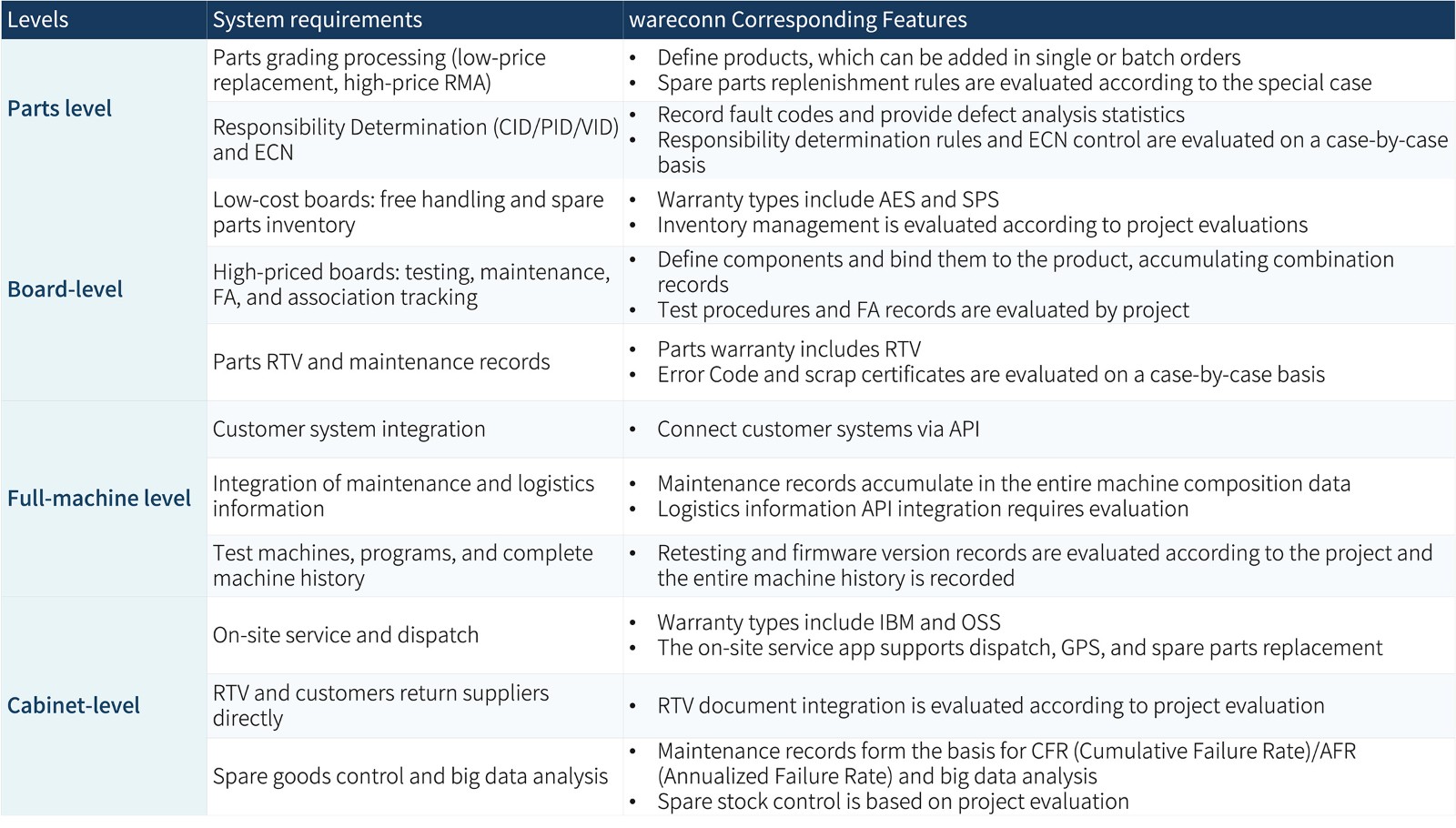
➤ System requirements and feature mapping: | ||||
Table 2: System requirements at each level mapped to wareconn features | ||||
Once data is connected, brand manufacturers can quickly pull up the complete history from component to rack when a customer complaint arrives; these structured records are also the foundation for failure-rate and root-cause analysis, allowing companies to keep improving through "structure the data → analyze → improve → observe again"[5]. Among the best-performing electronics companies, warranty claims are processed in about 5 days and warranty costs are about 1.8% of revenue[4]. | ||||
Conclusion | ||||
From components to racks, after-sales issues spread outward with each layer: the lower the layer, the closer to components and the supply chain; the higher the layer, the more it involves system integration and on-site service. The repair logic differs at each layer, yet all of it must be built on a data foundation that can be traced up and down. |
Author
Wareconn Editorial Department

Complete Guide to AI Server After-Sales Service, Part 1: Four Layers of After-Sales Challenges from Components to Racks..pdf
Reference
- AMAX, Manufacturing Level, AMAX Total Computing Solutions.
- Aly Pinder, 2022, Worldwide Manufacturing Product and Service Innovation 2023 Predictions, IDC FutureScape, IDC #US48627622.
- Wallace R. Blischke, M. Rezaul Karim, D. N. Prabhakar Murthy, 2011, Warranty Data Collection and Analysis, Springer.
- “Powering warranty reinvention: How electronics companies leverage new technologies to improve warranty management”, IBM Institute for Business Value, 2017.
- Albert Liao, 2022, Warranty Chain Management - Digitalization and Sustainability, Springer.
- Open Compute Project, Liquid Cooling Integration and Logistics White Paper, Revision 1.0 (CC BY-SA 4.0).
- NVIDIA, 2024, NVIDIA Contributes NVIDIA GB200 NVL72 Designs to Open Compute Project, NVIDIA Technical Blog.
- Hewlett Packard Enterprise, NVIDIA GB200 NVL72 by HPE QuickSpecs.
- Google Cloud, Proactive prevention: Inside Google Cloud's multi-layered GPU qualification process, Google Cloud Community.
- Crusoe, Burn-in validation, Crusoe Cloud Documentation.